Styles
Styles decide how nodes, edges and overlays look; the model only names kinds and tags. Style
blocks live in a pack’s or the project’s style.hcl, or inside a view, where they apply to that
view only (see view style rules).
- Style rules
- The cascade
- Node style properties
- Edge style properties
- Overlay style properties
- Shapes
- Arrow markers
- Animation
- The generic pack
Style rules
# nodes of the kind service and of the kinds that extend it
style "service" {
  shape  = "rounded"
  fill   = "#E8F0FE"
  stroke = "#1A73E8"
}

# nodes tagged deprecated
style "tag.deprecated" {
  stroke_dash = [4, 4]
  opacity     = 0.6
}

# edges of the kind rdma
edge_style "rdma" {
  stroke    = "#D93025"
  arrow_end = "none"
}

# a named style for view overlays
overlay_style "hull-red" {
  stroke  = "#D93025"
  fill    = "#FCE8E6"
  padding = 16
}
The label of a style or edge_style block selects what it applies to:
| Label | Applies to |
|---|---|
"service" |
nodes of the kind service and of every kind that extends it (for edge_style, edges of that edge kind) |
"tag.deprecated" |
nodes (edges) with the tag deprecated |
"node.kvstore", "edge.api-db" |
one node or edge; only in a view |
overlay_style blocks are named styles that an overlay picks with style = "<name>", and
shape blocks define custom shapes.
The cascade
Each property of a node or edge comes from the last of these that sets it:
- the styles of its kind’s ancestors, from the root (
node, ordefaultfor edges) down; - the style of its own kind;
- the styles of its tags, in the order the element lists its tags;
- in a view, the view’s rules: kind rules, then tag rules, then
node.<id>oredge.<id>rules.
The generic pack’s style "node" and edge_style "default" set every property that has a
default, so every property always has a value.
Node style properties
Colors are "#RGB", "#RRGGBB" or "none". Sizes are in pixels.
| Property | Values | Effect |
|---|---|---|
shape |
a built-in shape (rect, rounded, stadium, ellipse, diamond, cylinder, hexagon, parallelogram, document, person, cloud, text, image, point, bullseye, table) or a custom shape’s name |
the outline (see shapes) |
fill |
color or none |
the inside |
stroke |
color or none |
the outline |
stroke_width |
number, at least 0 | the outline’s width |
stroke_dash |
list of numbers, at least 0, such as [4, 4]; [] is solid |
dashes of the outline |
corner_radius |
number, at least 0 | the corners of rounded |
opacity |
number from 0 to 1 | the whole node |
text_color |
color or none |
the label and rows |
font_size |
number, at least 1 | the label and rows |
font_weight |
100, 200, … 900 | up to 500 is drawn regular, 600 and above bold |
sub_font_size |
number, at least 1 | the label after its first line break; unset: font_size |
sub_font_weight |
100, 200, … 900 | the label after its first line break; unset: font_weight |
sub_text_color |
color or none |
the label after its first line break; unset: text_color |
icon |
file("….svg") |
a picture above the label, twice font_size square |
image |
file("….svg") |
the picture of the image shape |
padding |
number, at least 0 | room between the outline and the label, rows or children |
min_w, min_h |
number, at least 0 | the smallest size the node is drawn at |
max_w |
number, at least 0 | labels wrap to fit this width, padding included; 0 never wraps |
z |
whole number | draw order among containers, and among other nodes |
Labels break at \n and wrap at word boundaries; lines are 1.4 × font_size apart, rounded up.
Containers are drawn before the nodes they can hold, so z orders containers among containers
and other nodes among other nodes; edges are drawn over every node.
Container properties
These properties arrange the children of a container; see container policies for how.
| Property | Values | Effect |
|---|---|---|
layout |
free (default), stack or grid |
who places the children: themselves, or the container in a row or a grid |
direction |
vertical or horizontal |
the way a stack runs |
gap |
number, at least 0 | room between stacked children or grid cells |
stretch |
true or false |
in a stack, children all take its full width (height, for horizontal) |
columns |
whole number, at least 1 | the columns of a grid |
align |
start, center or end |
children aligned across a stack, or in their grid cells |
label_side |
top or left |
left draws the label turned a quarter counterclockwise along the left edge, as on a swimlane |
Edge style properties
| Property | Values | Effect |
|---|---|---|
stroke |
color or none |
the line and its markers |
stroke_width |
number, at least 0 | the line’s width |
stroke_dash |
list of numbers, at least 0 | dashes of the line; markers are never dashed |
arrow_start |
an arrow marker: none, arrow, triangle, triangle-open, diamond, diamond-open, circle, circle-open, crow-one, crow-zero-one, crow-many, crow-one-many, crow-zero-many |
the marker at from |
arrow_end |
an arrow marker: none, arrow, triangle, triangle-open, diamond, diamond-open, circle, circle-open, crow-one, crow-zero-one, crow-many, crow-one-many, crow-zero-many |
the marker at to |
routing |
orthogonal (default), polyline or straight |
horizontal and vertical segments; segments at any angle; or one straight line, through anything |
font_size |
number, at least 1 | the edge’s labels |
animate |
none (default) or flow |
see animation |
Overlay style properties
An overlay is drawn with overlay_style "hull", overridden by the properties of the overlay style
it names.
| Property | Values | Effect |
|---|---|---|
fill |
color or none |
the inside of the outline |
stroke |
color or none |
the outline and the overlay’s label |
stroke_width |
number, at least 0 | the outline’s width |
stroke_dash |
list of numbers, at least 0 | dashes of the outline |
opacity |
number from 0 to 1 | the whole overlay |
padding |
number, at least 0 | room between the members’ boxes and the outline, and its corners’ radius |
Shapes
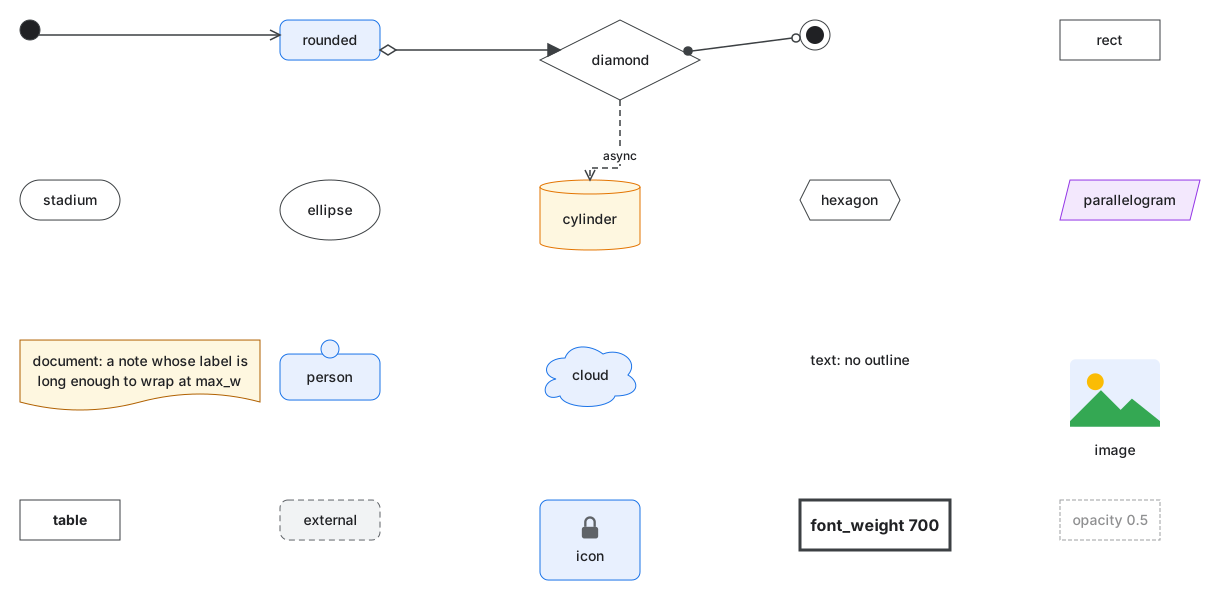
| Shape | Drawn as |
|---|---|
rect |
a rectangle |
rounded |
a rectangle with corners of corner_radius |
stadium |
a rectangle with half-circle ends |
ellipse, diamond, hexagon, parallelogram, cloud |
the named outline around the label |
cylinder |
a database cylinder |
document |
a page with a wavy bottom edge |
person |
a head above a rounded body that holds the label |
text |
the label alone, without an outline |
image |
the style’s image picture above the label, at least six times font_size square, without an outline |
point |
a filled dot without a label, sized by min_w and min_h: junctions, initial states |
bullseye |
a dot in a ring without a label: final states |
table |
a box with the label above the node’s rows and compartments; a node without rows is a rect |
Edges end on the outline of each shape. Pictures (icon, image and custom shapes) are SVG files
read with file(): well-formed XML whose root is an svg element in the SVG namespace. Other
picture formats are not supported.
Custom shapes
A shape block draws nodes with an SVG picture:
shape "chip" {
  svg      = file("shapes/chip.svg")
  text_box = [0.15, 0.15, 0.7, 0.7]
  anchors  = { in = [0, 0.5], out = [1, 0.5] }
  stretch  = "uniform"
}

style "chip" {
  shape = "chip"
}
text_boxis where the label goes:x,y,wandhas fractions of the box, by default the whole box,[0, 0, 1, 1].anchorsplaces ports at points given as fractions of the box.- Each name in
anchorsmust be a port of every kind whose style uses the shape; other ports are placed as usual. stretch:nine-slicekeeps the corners of the picture (a quarter of its width and height in from each edge) at their size and stretches the edges and middle;uniformscales the picture and keeps the box at its aspect ratio;nonedraws the picture at its size, centered.- The picture’s size is its
viewBox, else itswidthandheight, else 100 by 100. - A shape’s name cannot be a built-in shape’s. The picture has its own colors:
fillandstrokeare not drawn.
Arrow markers
arrow_start and arrow_end take:
| Marker | Drawn as |
|---|---|
none |
nothing |
arrow |
an open arrowhead (two lines) |
triangle, triangle-open |
a filled or hollow triangle (UML inheritance: triangle-open) |
diamond, diamond-open |
a filled or hollow diamond (UML composition and aggregation) |
circle, circle-open |
a filled or hollow circle |
crow-one |
two bars: exactly one |
crow-zero-one |
a bar, then a ring: zero or one |
crow-many |
a crow’s foot: many |
crow-one-many |
a crow’s foot, then a bar: one or many |
crow-zero-many |
a crow’s foot, then a ring: zero or many |
Hollow markers are filled white; the others take the edge’s stroke. Crow’s-foot markers read
outward from the node. The generic pack’s edge tags start-one, end-zero-many and so on set
them without a style of your own.
Animation
animate = "flow" draws the edge dashed (with its stroke_dash, or [6, 4]) and moves the
dashes from from toward to, one dash period every half second. Every animated edge repeats
with the same half-second period. Animation is a style, so it is chosen by edge kind, tag or a
view rule, never set on an edge in the model:
edge_style "tag.hot" {
  animate = "flow"
}
An exported SVG keeps the animation as CSS. A GIF holds one period in 10 frames and loops; a PNG shows the edge still.
The generic pack
The built-in generic pack is always loaded first. Its spec and style are
packs/generic/spec.hcl and
packs/generic/style.hcl; this section is generated from them.
persondraws a head above a rounded body holding the label.lane-setis a pool: it stacks itslanechildren, each labeled along its left edge.grid-groupplaces its children in a grid of three columns.stateis a state with substates;simple-stateis one without.initial,finalandjunctiondraw no label.tableandclasshold rows;classdraws them in compartments.
| Kind | Spec | Style |
|---|---|---|
node |
the defaults below | |
service |
shape = "rounded", fill = "#E8F0FE", stroke = "#1A73E8" |
|
database |
shape = "cylinder", fill = "#FEF7E0", stroke = "#E37400" |
|
queue |
shape = "parallelogram", fill = "#F3E8FD", stroke = "#9334E6" |
|
storage |
shape = "cylinder", fill = "#FEF7E0", stroke = "#E37400" |
|
person |
shape = "person", fill = "#E8F0FE", stroke = "#1A73E8" |
|
external |
shape = "rounded", fill = "#F1F3F4", stroke = "#5F6368", stroke_dash = [6, 4] |
|
note |
shape = "document", fill = "#FEF7E0", stroke = "#B06000" |
|
decision |
shape = "diamond" |
|
terminal |
shape = "stadium" |
|
initial |
shape = "point", fill = "#202124", min_w = 20, min_h = 20 |
|
final |
shape = "bullseye", fill = "#202124", min_w = 26, min_h = 26 |
|
simple-state |
shape = "rounded", fill = "#FFFFFF", stroke = "#3C4043" |
|
junction |
shape = "point", fill = "#3C4043", min_w = 10, min_h = 10 |
|
group |
container = true |
fill = "#F8F9FA", stroke = "#9AA0A6", padding = 20 |
lane-set |
container = true |
fill = "#FFFFFF", stroke = "#9AA0A6", padding = 10, layout = "stack", direction = "vertical", gap = 0, stretch = true, label_side = "left" |
lane |
container = true |
fill = "#F8F9FA", stroke = "#9AA0A6", padding = 20, label_side = "left" |
grid-group |
container = true |
fill = "#F8F9FA", stroke = "#9AA0A6", padding = 20, layout = "grid", columns = 3 |
state |
container = true |
shape = "rounded", fill = "#FFFFFF", stroke = "#3C4043", padding = 20 |
table |
rows = true |
shape = "table", padding = 8, font_weight = 700 |
class |
rows = true |
shape = "table", fill = "#FFFDE7", padding = 8, font_weight = 700 |
| Edge kind | Style |
|---|---|
default |
the defaults below |
async |
stroke_dash = [6, 4] |
association |
arrow_end = "none" |
inherits |
arrow_end = "triangle-open" |
realizes |
stroke_dash = [6, 4], arrow_end = "triangle-open" |
composition |
arrow_start = "diamond", arrow_end = "none" |
aggregation |
arrow_start = "diamond-open", arrow_end = "none" |
dependency |
stroke_dash = [6, 4] |
| Edge tag | Style |
|---|---|
start-one |
arrow_start = "crow-one" |
start-zero-one |
arrow_start = "crow-zero-one" |
start-many |
arrow_start = "crow-many" |
start-one-many |
arrow_start = "crow-one-many" |
start-zero-many |
arrow_start = "crow-zero-many" |
end-one |
arrow_end = "crow-one" |
end-zero-one |
arrow_end = "crow-zero-one" |
end-many |
arrow_end = "crow-many" |
end-one-many |
arrow_end = "crow-one-many" |
end-zero-many |
arrow_end = "crow-zero-many" |
The defaults, which every other style overrides:
style "node" {
  shape         = "rect"
  fill          = "#FFFFFF"
  stroke        = "#3C4043"
  stroke_width  = 1
  stroke_dash   = []
  corner_radius = 8
  opacity       = 1
  text_color    = "#202124"
  font_size     = 14
  font_weight   = 400
  padding       = 10
  min_w         = 100
  min_h         = 40
  max_w         = 240
  z             = 0
  layout        = "free"
  direction     = "vertical"
  gap           = 10
  stretch       = false
  columns       = 3
  align         = "start"
  label_side    = "top"
}

edge_style "default" {
  stroke       = "#3C4043"
  stroke_width = 1.5
  stroke_dash  = []
  arrow_start  = "none"
  arrow_end    = "arrow"
  routing      = "orthogonal"
  font_size    = 12
  animate      = "none"
}

overlay_style "hull" {
  fill         = "none"
  stroke       = "#5F6368"
  stroke_width = 1.5
  stroke_dash  = [4, 4]
  opacity      = 1
  padding      = 12
}