dg
dg draws diagrams from text: you write what exists as an HCL model, arrange it by dragging in a panel beside your editor in VS Code, and dg routes the arrows around the boxes every time it draws.
Coding agents: read the dg skill before using dg. To keep it, run
npx skills add nvcnvn/dg or copy the skills/dg folder into your skills folder, such as
~/.claude/skills.
- Getting started: install the VS Code extension, write a first diagram, arrange it, check it and export it.
- VS Code extension: diagnostics, completion, rename and formatting in the editor, the diagram in a panel beside it, and how the extension works with the command line.
- Examples: architecture and C4 with drill-down, entity-relationship, class, flowchart, swimlane, state machine, network, animated edges, shapes.
- Reference: the language, styles, views and layout files, the command line, operations, and the editor’s gestures.
- Design and rationale: every design decision and why it was made.
- Development: building and testing dg, and how this documentation is kept current.
These pages are also published as a website at https://nvcnvn.github.io/dg/.
A diagram
From examples/hello:
node "backend" {
  kind  = "group"
  label = "Backend"
}

node "api" {
  kind   = "service"
  label  = "API"
  parent = node.backend
}
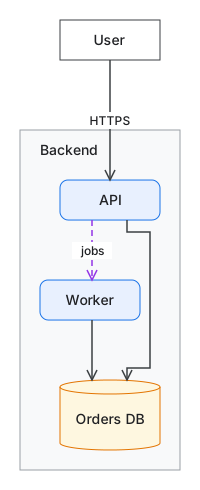
The model holds no colors, shapes or positions: kinds such as service and group decide how
nodes look, positions go in a separate layout file that the editor writes, and edges are never
stored, only routed.
dg is for diagrams of things and how they connect: architecture, infrastructure and networks, flowcharts and swimlanes, entity-relationship and class diagrams, state machines. It is not for diagrams where position is data, such as sequence diagrams, Gantt charts and timelines, charts, or Venn diagrams.
Install
Install dg Diagrams from
the VS Code Marketplace, or from Open VSX
in VSCodium, Cursor and Windsurf. It holds everything it needs, and its own dg binary is on the
PATH of the editor’s terminals.
To use dg outside those terminals, such as in CI or from an MCP client that starts it itself, install the command line as well, on Linux and macOS or in Git Bash on Windows:
curl -fsSL https://raw.githubusercontent.com/nvcnvn/dg/main/install.sh | bash
The getting-started guide has the options, the manual download and the build from source.
Licensing
dg is licensed under the Apache License 2.0. The
dg binary and the VS Code extension’s package also hold the code of others: Go modules, the npm
packages of the web app and of the extension, libavoid, and the HCL grammar (with its scope name
changed), each listed with its copyright and license in
THIRD_PARTY_NOTICES.
The arrows are routed by libavoid, Copyright (C) 2004-2015 Monash University (author Michael
Wybrow), parts Copyright (C) 1998 Joseph O’Rourke, under the GNU Lesser General Public License 2.1
or later. dg uses it compiled to WebAssembly by
libavoid-js 0.4.5 (tag v0.4.5), whose build scripts
compile libavoid from the adaptagrams fork at tag v1.0.4
(commit dd3236536399e5297b353d02c0b751eeaaf63aee): those two are libavoid’s corresponding
source. You may replace libavoid with a modified version. dg keeps its WebAssembly module and
JavaScript glue as files of their own, and dg’s source is open, so replacing libavoid is
rebuilding dg with your two files in their place:
Development gives the steps.