Examples
Each example is a project in the examples directory of the repository. The pictures are
dg export output of those projects, regenerated whenever the drawing changes. To open one in the
editor, run dg serve -C examples/<name> from the repository; dg export -C examples/<name>
draws it.
- Architecture: a C4 container diagram
- C4 at three levels, with drill-down
- Animated edges
- Entity-relationship diagram
- Class diagram
- Flowchart
- Swimlanes
- State machine
- Network and infrastructure
- Incident board: overlays and decorations
- Shapes and styles
- Labels: subtitles, and a label per view
Architecture: a C4 container diagram
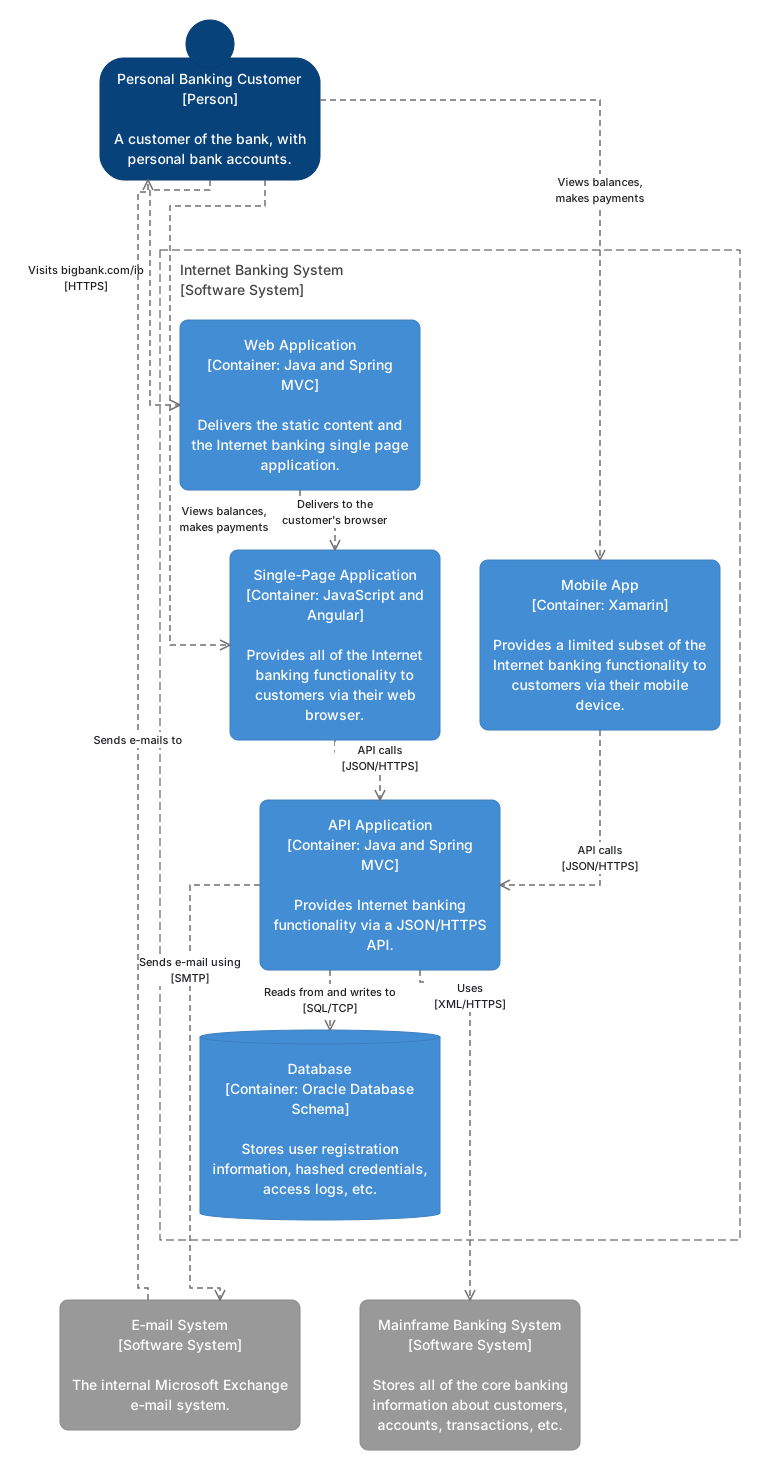
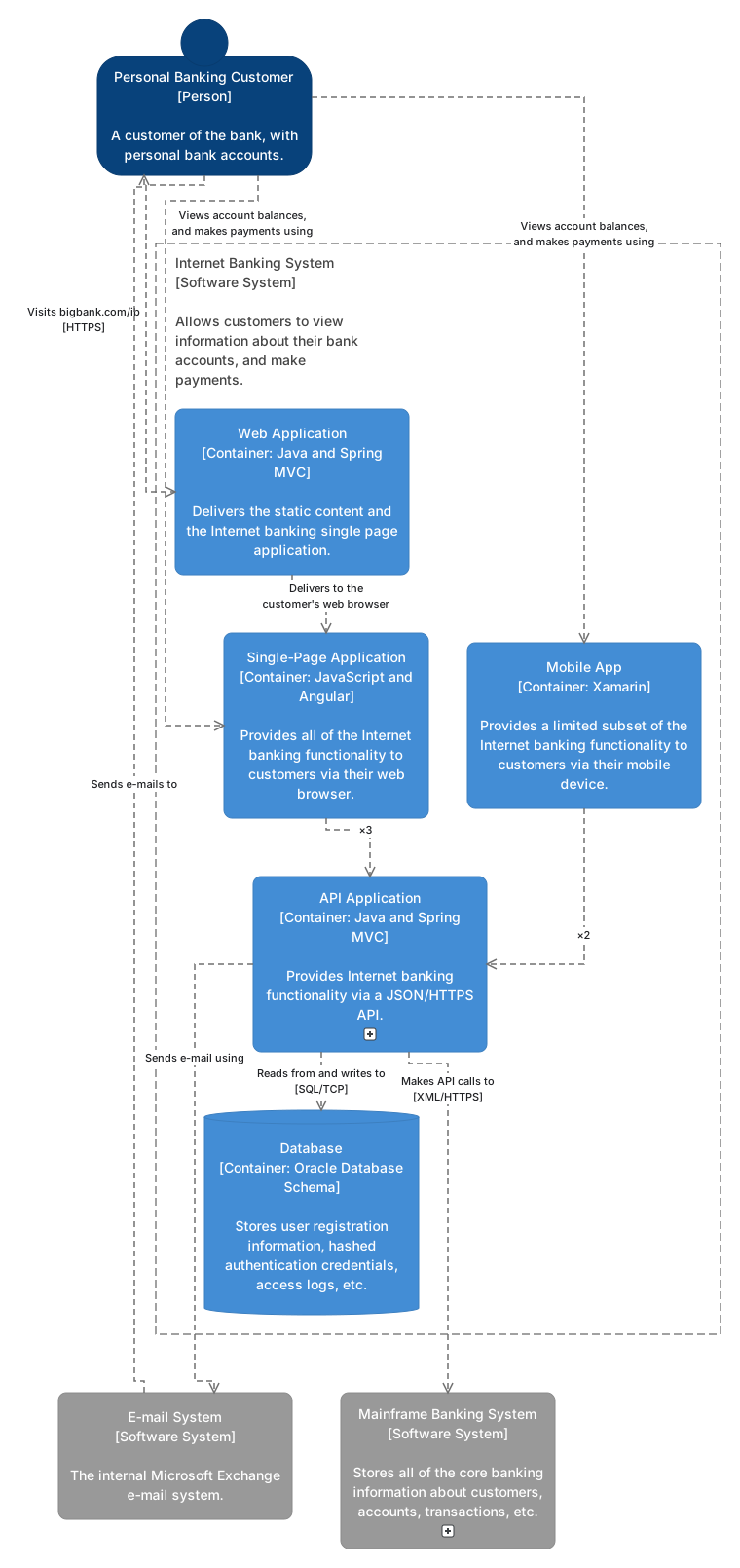
examples/c4-container is the container diagram of the C4
model’s Internet Banking System. It brings its own vocabulary as a local pack, listed in
dg.hcl: kinds such as c4-person, app, store and boundary, and their styles. The system
is a container node that holds its containers:
node "banking" {
  kind  = "boundary"
  label = "Internet Banking System\n[Software System]"
}

node "web-app" {
  kind   = "app"
  parent = node.banking
  label  = "Web Application\n[Container: Java and Spring MVC]\n\nDelivers the static content and the Internet banking single page application."
}
\n breaks a label into lines; longer lines wrap at the style’s max_w, or at a pinned width. The pack’s kinds are
plain declarations, and their look is in its style.hcl:
kind "app" {}

kind "store" {}

kind "boundary" {
  container = true
}

edge_kind "uses" {}
Nothing is pinned in the view main, so dg lays it out:
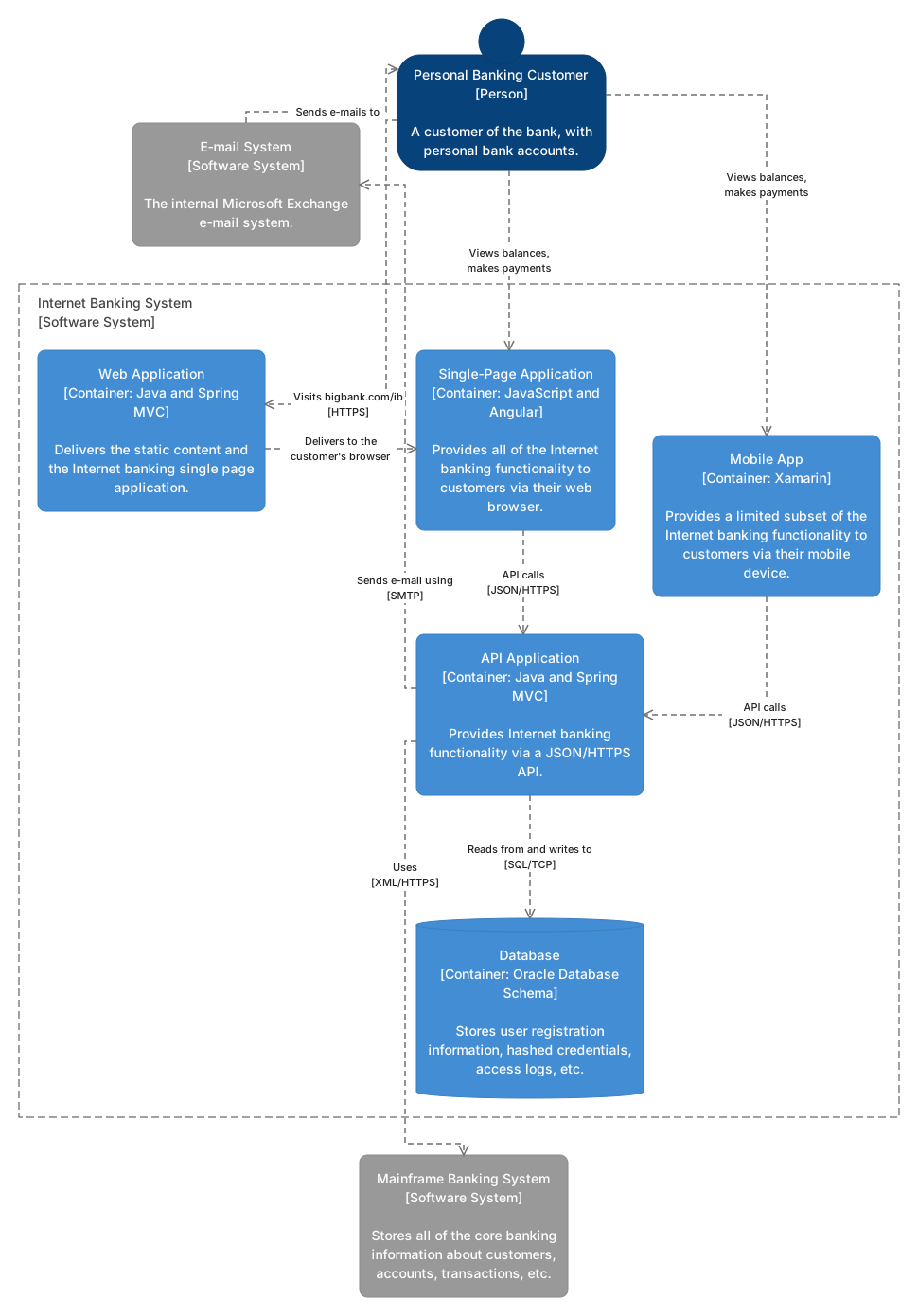
The view pinned shows the same nodes with a layout file that pins some of them; dg places the
others around them, and every edge is routed around the boxes:
C4 at three levels, with drill-down
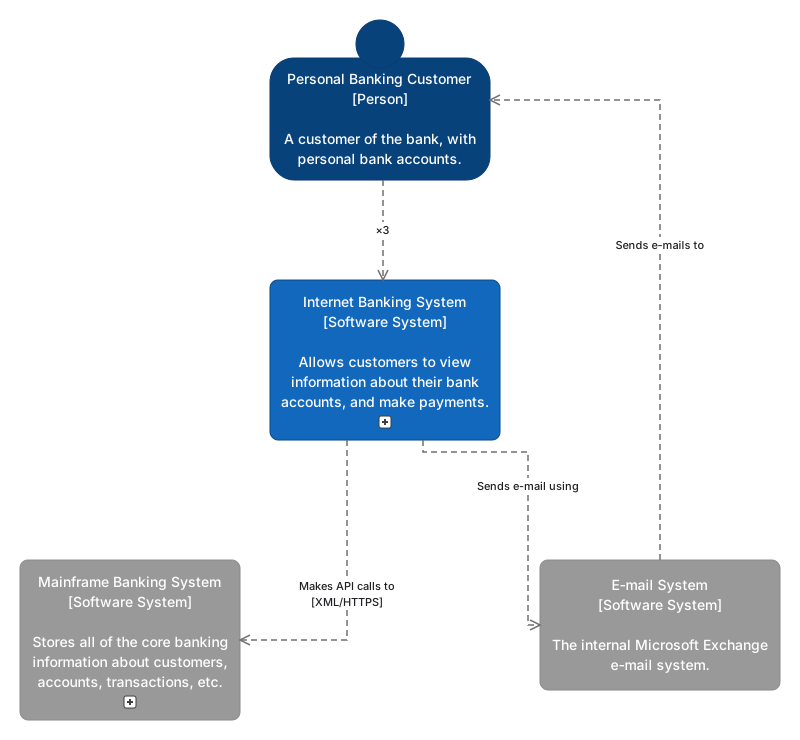
examples/c4 holds one model of the same system down to the
components of its API, and three views of it. Relationships are written between the most
detailed elements; a view that collapses a system or a container lifts them to the box it draws,
and merges the edges that then join the same two boxes.
view "main" {
  title    = "Internet Banking System: system context"
  collapse = [kind.system]
}
A view with of shows the inside of a container. In the editor, the container then has a
drill-down badge in every other view that opens it, and the view has breadcrumbs back:
view "containers" {
  title    = "Internet Banking System: containers"
  of       = node.banking
  include  = [descendants.banking, node.banking, node.customer, node.mainframe, node.email]
  collapse = [node.api, node.mainframe]

  style "node.banking" {
    shape       = "rect"
    fill        = "none"
    stroke      = "#444444"
    stroke_dash = [8, 4]
    text_color  = "#444444"
    padding     = 20
  }
}
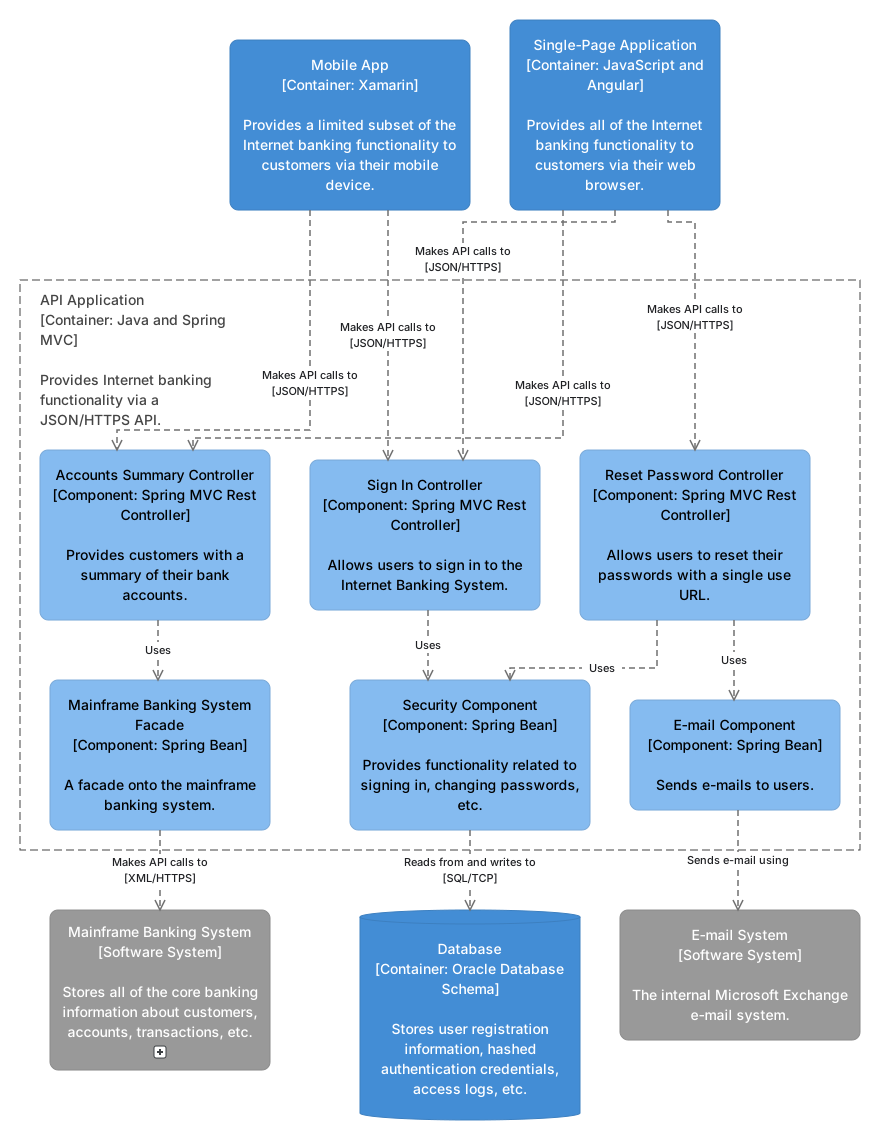
The view style rule style "node.banking" draws the system as a dashed boundary in this view
only; the context view draws it as a filled box.
Animated edges
Animation is a style: an edge style with animate = "flow" moves dashes along its edges from
from to to. In examples/c4-container the
edge kind interaction is a step of a dynamic diagram:
edge_style "interaction" {
  stroke    = "#1168BD"
  font_size = 11
  animate   = "flow"
}
and the view sign-in shows only those edges:
view "sign-in" {
  title   = "Internet Banking System: signing in"
  include = [node.customer, node.banking, node.spa, node.api, node.database]
  edges   = [edge_kind.interaction]
}
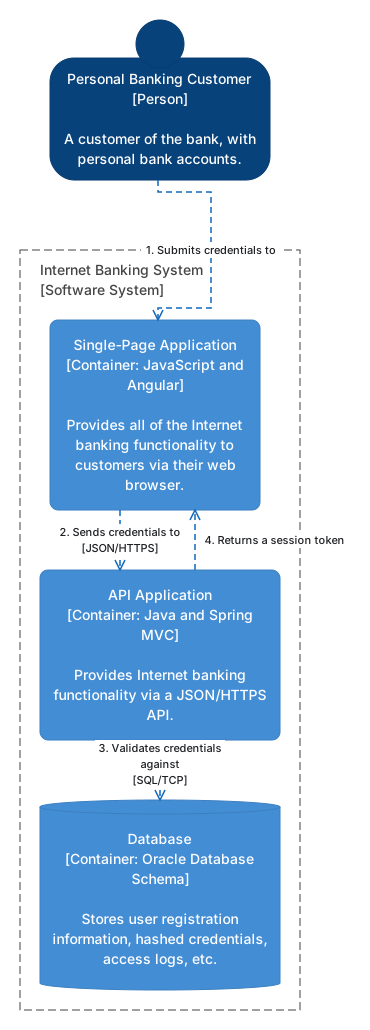
An exported SVG keeps the animation as CSS; --format gif exports one looping period of it, and
--format png the drawing at its start.
Entity-relationship diagram
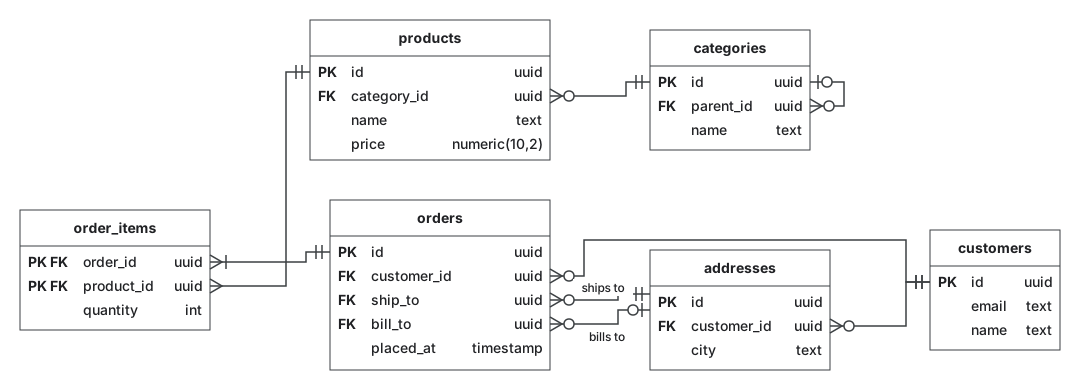
In examples/er each table is a node of the kind table with row
blocks. A row is also a port: an edge from node.orders.row.customer_id attaches at the end of
that row facing the other table. Crow’s-foot cardinality comes from the generic pack’s edge tags,
start-… for the from end and end-… for the to end:
node "orders" {
  kind = "table"
  row "id" {
    type = "uuid"
    key  = "PK"
  }
  row "customer_id" {
    type = "uuid"
    key  = "FK"
  }
edge "order-customer" {
  from = node.orders.row.customer_id
  to   = node.customers.row.id
  tags = ["start-zero-many", "end-one"]
}
Class diagram
examples/class uses the kind class, whose rows are grouped in
compartments, and the generic pack’s edge kinds inherits, realizes, composition,
aggregation and association. Labels at the ends of an edge hold multiplicities:
node "Payment" {
  kind = "class"
  compartment "fields" {
    row "amount" {
      type = "Money"
    }
  }
  compartment "methods" {
    row "pay()" {
      type = "Receipt"
    }
  }
}
edge "places" {
  from   = node.Customer
  to     = node.Order
  kind   = "association"
  labels = { start = "1", mid = "places", end = "0..*" }
}
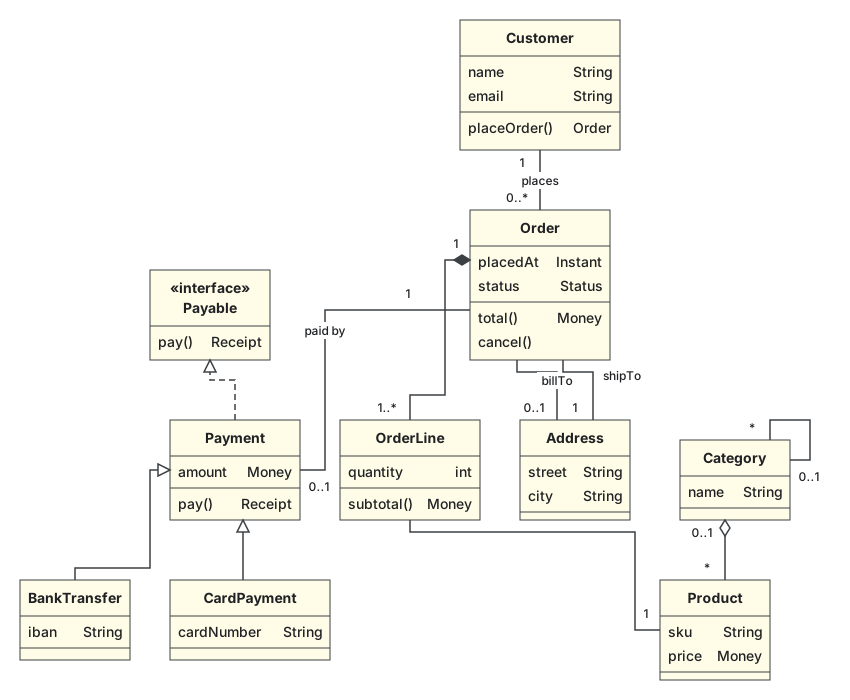
The first layout puts a general class above the classes that inherit from it.
Flowchart
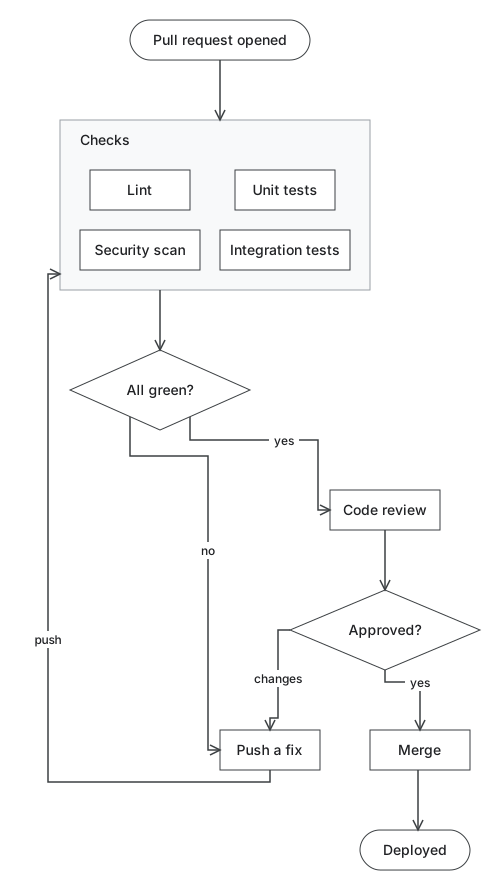
examples/flowchart uses the generic pack’s terminal,
decision and node kinds. The checks that run in parallel are in a grid-group, a container
that places its children in a grid; the view’s style rule makes it two centered columns:
view "main" {
  title = "Pull request pipeline"

  # Two centered columns of checks.
  style "node.checks" {
    align   = "center"
    columns = 2
    gap     = 20
  }
}
The view’s layout file stores the order of the checks and an edge hint that makes the loop back leave the bottom of “Push a fix” and enter the checks from the left. The loop back stays a loop back: the first layout runs from the start of the flow.
Swimlanes
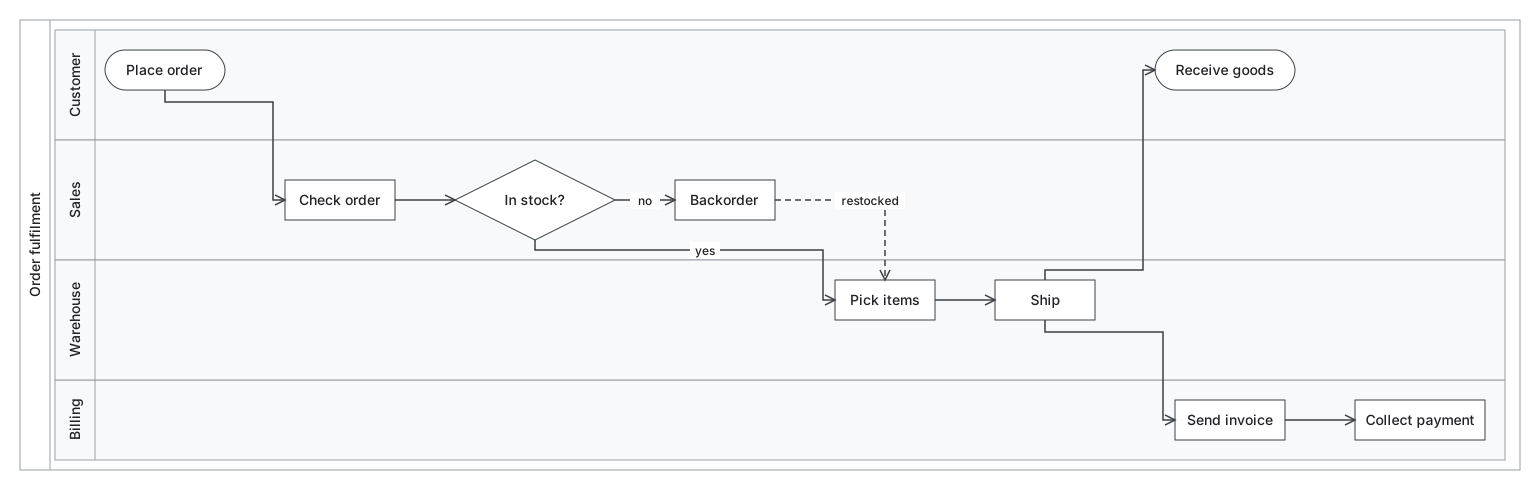
In examples/swimlane a lane-set (a pool) stacks its lane
children, each labeled along its left edge, and each lane holds its steps placed freely. The
first layout lines the steps up across the lanes in the order the edges run:
node "fulfilment" {
  kind  = "lane-set"
  label = "Order fulfilment"
}

node "customer" {
  kind   = "lane"
  label  = "Customer"
  parent = node.fulfilment
}
The order of the lanes is in the view’s layout file (fulfilment: {order: [customer, sales,
warehouse, billing]}); dragging a lane in the editor reorders it.
State machine
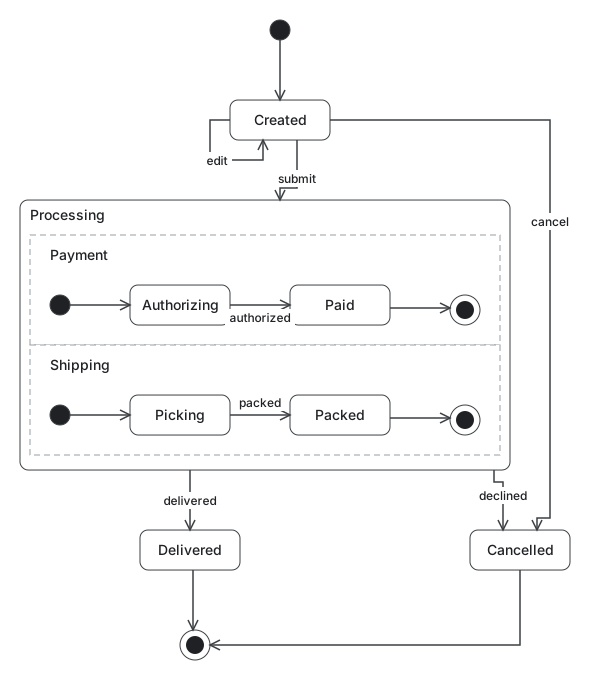
examples/state-machine uses initial, final and
simple-state from the generic pack. A state with concurrent regions is a project kind that
extends state and stacks its children:
kind "regions" {
  extends = "state"
}

kind "region" {
  container = true
}
style "regions" {
  padding   = 10
  layout    = "stack"
  direction = "vertical"
  gap       = 0
  stretch   = true
}
A self-transition is an edge from a node to itself:
edge "created-edit" {
  from  = node.created
  to    = node.created
  label = "edit"
}
Network and infrastructure
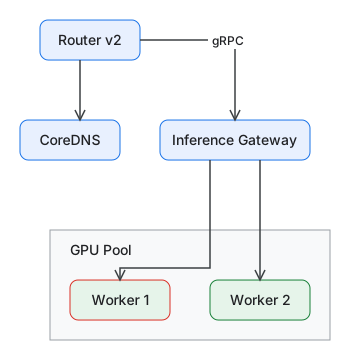
examples/inference models an inference cluster with a local
pack of kinds that have ports and typed properties, a hand-written model, and a generated model
that dg never writes:
project "inference" {
  packs     = ["generic", "packs/inference"]
  models    = ["model.hcl", "generated/*.hcl"]
  read_only = ["generated/*.hcl"]
}
kind "gpu-node" {
  ports             = ["nic0", "nic1"]
  default_port_side = "auto"
  property "gpu_count" {
    type    = number
    default = 8
  }
}
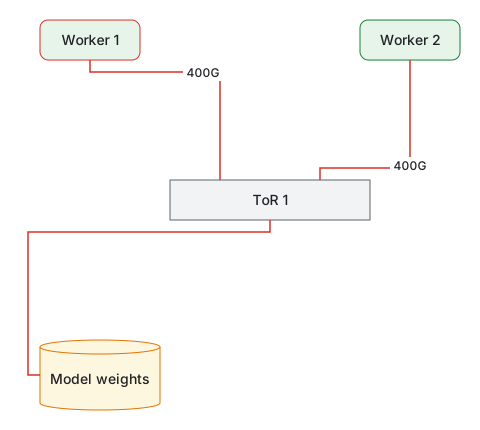
A node can add its own ports, here 8 of them with port_range, and an edge can end at a port:
node "tor-1" {
  kind  = "switch"
  label = "ToR 1"
  ports = port_range("p", 1, 8)
  props = { speed = "400G" }
}
edge "w1-tor" {
  from  = node.worker-1.port.nic0
  to    = node.tor-1.port.p1
  kind  = "rdma"
  label = "400G"
}
Two views select by kind and edge kind: the request path, and the RDMA fabric. The fabric’s
layout file
pins the switch’s ports p1 and p2 apart along its top and p8 on its bottom; ports are
points on a node’s border, not drawn themselves, so each edge ends where its port is.
view "rdma" {
  title   = "RDMA fabric"
  include = [kind.gpu-node, kind.switch, kind.storage]
  edges   = [edge_kind.rdma]
}
Incident board: overlays and decorations
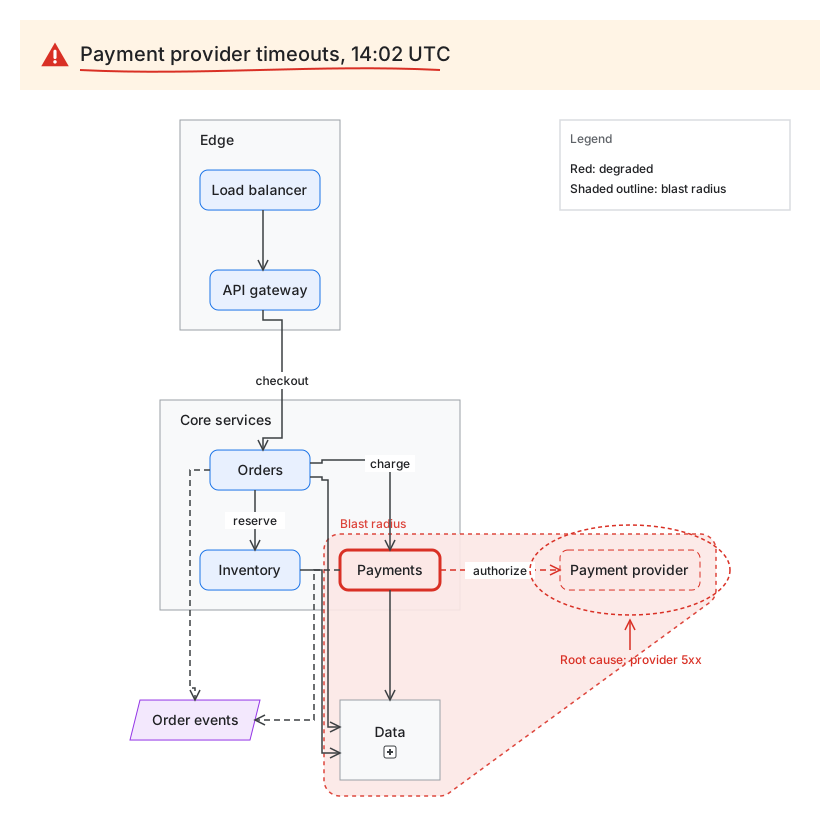
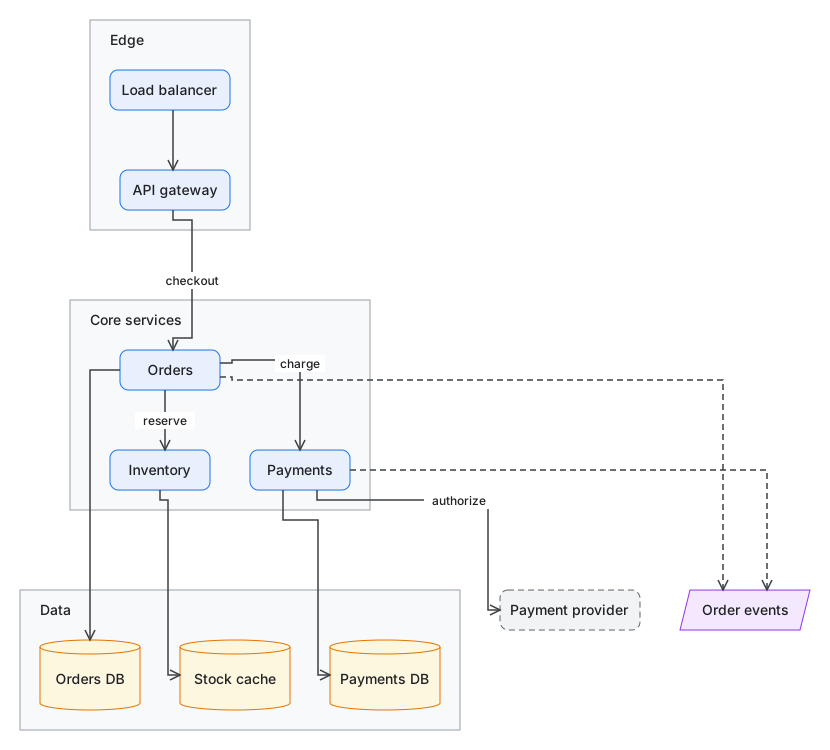
examples/incident draws a checkout platform, and an incident
view of it: a collapsed data tier, an overlay outlining every node tagged degraded, view style
rules that apply only in this view, and an animated edge.
view "incident" {
  title    = "Incident: payment provider timeouts"
  collapse = [node.data]

  overlay "blast-radius" {
    members = [tag.degraded]
    style   = "hull-red"
    label   = "Blast radius"
  }

  style "tag.degraded" {
    fill   = "#FCE8E6"
    stroke = "#D93025"
  }

  style "node.payments" {
    stroke_width = 3
  }

  edge_style "edge.payments-psp" {
    stroke  = "#D93025"
    animate = "flow"
  }
}
The title band, the icon, the legend and the notes around the payment provider are decorations in the view’s layout file: drawing that belongs to the view, not the model. Some are attached to a node and move with it.
Shapes and styles
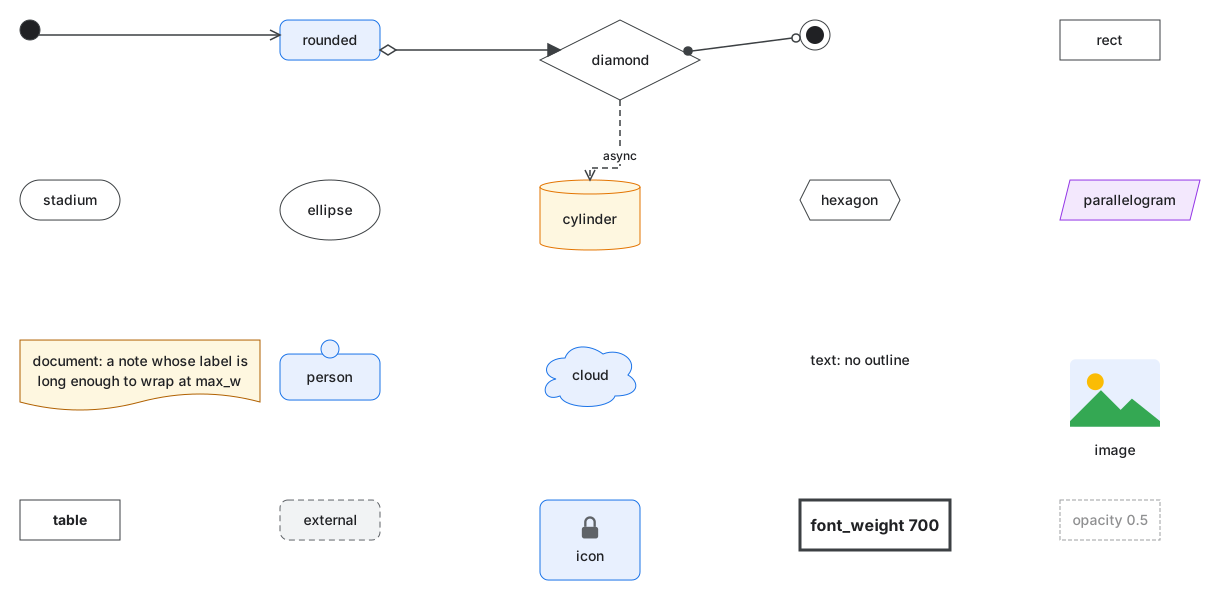
examples/shapes draws every built-in shape, two custom shapes
from SVG files with anchors for their ports, an icon, and the node and edge style properties.
shape "chip" {
  svg      = file("shapes/chip.svg")
  text_box = [0.15, 0.15, 0.7, 0.7]
  anchors  = { in = [0, 0.5], out = [1, 0.5] }
  stretch  = "uniform"
}
edge_style "tag.straight" {
  routing     = "straight"
  arrow_start = "circle"
  arrow_end   = "circle-open"
}
The view gallery shows the shapes and node styles in a grid that its layout file pins:
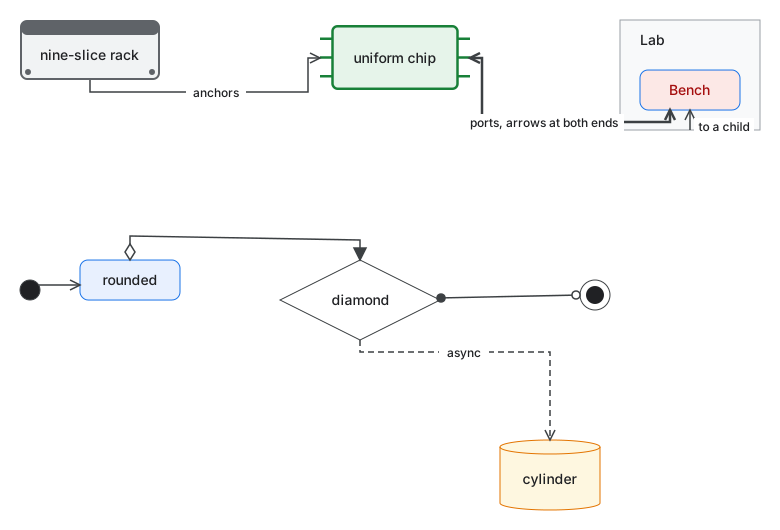
The view wiring pins nodes and a port, and gives edges hints: the sides they leave and enter
by, a point to pass through, and where the label sits.
Labels: subtitles, and a label per view
examples/labels draws one
model twice. The style draws what follows the first line break of a label as a subtitle:
style "node" {
  font_weight     = 600
  sub_font_size   = 11
  sub_font_weight = 400
  sub_text_color  = "#5F6368"
}
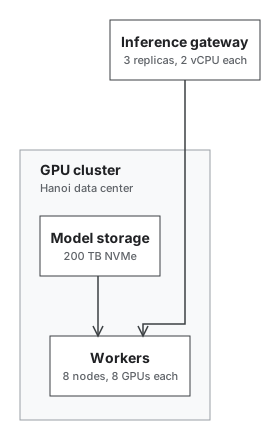
The view main shows the model’s labels, and sizing gives three nodes labels of its own, with
no second set of nodes in the model:
view "sizing" {
  title = "How large it is"

  node "gateway" {
    label = "Inference gateway\n3 replicas, 2 vCPU each"
  }
  node "workers" {
    label = "Workers\n8 nodes, 8 GPUs each"
  }
  node "storage" {
    label = "Model storage\n200 TB NVMe"
  }
}